The Decision Nobody Gets Right the First Time
Every team building a RAG pipeline hits the same question around week two: where do the vectors go? The answer feels simple until you're debugging ghost documents at 3 AM because your vector index and your Postgres rows are out of sync.
The vector database market has exploded. Pinecone, Qdrant, Weaviate, Milvus, Chroma, LanceDB, pgvector — there are more options than there are production deployments using them correctly. Most comparison articles benchmark insert speed and recall on a clean dataset. Production is messier. You need to know what breaks at scale, what costs actually look like at 10 million vectors, and when the "just use pgvector" advice stops being good advice.
Three Philosophies, Three Trade-offs
pgvector: The Zero-Infrastructure Play
pgvector is a PostgreSQL extension. Install it, run CREATE EXTENSION vector, add a vector column, create an HNSW index, and you're doing vector search in the database you already have. No new service, no sync layer, no additional infrastructure to monitor.
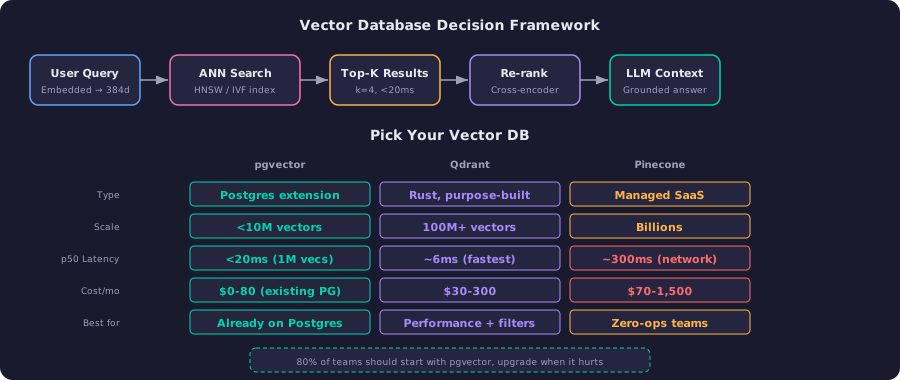
At one million vectors with HNSW indexing, pgvector delivers query times under 20 milliseconds and recall above 95%. That's fast enough for most RAG applications. The cost is effectively zero if you already run Postgres — you're reusing compute you're already paying for.
The catch: pgvector is PostgreSQL, and PostgreSQL is a general-purpose database doing a specialized job. Beyond 10 million vectors, query performance degrades noticeably. Write throughput becomes a bottleneck under concurrent load. There's no built-in sharding for vector data. You can push it further with pgvectorscale and careful tuning, but at some point you're fighting the architecture.
When to use it: you already run Postgres, you have under 5 million vectors, and you don't want to manage a separate service. This covers roughly 80% of RAG deployments.
Qdrant: The Performance Play
Qdrant is purpose-built for vector search, written in Rust, and designed from the ground up for the workload. It's not an extension bolted onto something else — the entire storage engine, indexing, and query path are optimized for high-dimensional similarity search.
The performance difference is real. Qdrant's p50 latency sits around 6 milliseconds — roughly 3x faster than pgvector on equivalent hardware. At 50 million vectors, Qdrant maintains 41 QPS at 99% recall. Where it really shines is filtered search: Qdrant applies metadata filters before the vector search, not after. This means filtering by tenant, date range, or category doesn't degrade recall the way post-filtering does.
Self-hosted Qdrant runs on a single node with 8GB RAM for around $30-50 per month. Qdrant Cloud managed service costs $100-300 per month. Both are dramatically cheaper than Pinecone at scale.
When to use it: you need sub-10ms latency, you're past 10 million vectors, or you need complex metadata filtering. Open source with flexible deployment — run it on your own infrastructure or use their cloud.
Pinecone: The Zero-Ops Play
Pinecone is a fully managed vector database. You get an API key, create an index, and start querying. No instances to size, no indexes to tune, no infrastructure to manage.
The convenience is genuine. For a team without dedicated infrastructure engineers, Pinecone removes an entire category of operational work. It scales to billions of vectors without you thinking about sharding or replication. The API is clean and well-documented.
The trade-offs are cost and latency. Pinecone's p50 semantic search clocks in around 300 milliseconds — roughly 50x slower than Qdrant, with most of that being network round-trip. At 5 million vectors, monthly costs can reach $500-1,500. You're paying a significant premium for the managed experience, and you're locked into their infrastructure.
When to use it: your team has no infrastructure expertise, you need to ship fast, and cost isn't the primary constraint. Common in early-stage startups burning through runway.
What Breaks in Production
Benchmarks show you the happy path. Production shows you everything else.
Vector Drift
Your embedding model gets updated. Your documents change. The vectors in your index slowly drift out of alignment with reality. Queries still return results — they just return worse results. Detecting this is hard because determining if top-10 results are actually the best requires computing true top-10 across the entire dataset, which is the expensive operation you built the index to avoid.
The fix: schedule periodic re-indexing. Track recall against a golden test set. Monitor retrieval quality as a metric, not just latency and throughput.
Ghost Documents
When your application data lives in Postgres and your vectors live in Pinecone (or Qdrant, or anywhere separate), you have a consistency problem. Delete a document from your primary database and forget to delete its vector? Now vector search returns a reference to something that doesn't exist. Your user sees an error or, worse, stale content.
pgvector sidesteps this entirely — vectors and documents live in the same database, same transaction. For separate vector databases, you need a sync layer with eventual consistency guarantees. Most teams underestimate how tricky this gets under concurrent writes.
The 10 Million Vector Wall
Most vector databases perform beautifully at 1 million vectors. The real test is at 10 million, 50 million, and 100 million. Memory requirements grow linearly with vector count. HNSW indexes consume 1.5-2x the raw vector data in memory. At 100 million 384-dimensional vectors, you're looking at 150-200 GB of RAM just for the index.
pgvector hits this wall hardest because PostgreSQL wasn't designed for it. Qdrant handles it through efficient memory mapping and optional disk-based indexes. Pinecone handles it by abstracting the problem away (and charging accordingly).
Filtered Search Performance
Most RAG systems don't just search by similarity — they also filter by metadata. "Find similar documents, but only from this tenant, published after this date." The naive approach searches first, then filters, which can eliminate most of your top-K results. The better approach filters first, then searches within the filtered set.
Qdrant does pre-filtering natively. pgvector requires careful query construction with partial indexes. Pinecone supports metadata filtering but with namespace limitations at scale.
Cost at Scale: The Real Numbers
At 1 million vectors (384 dimensions):
pgvector on an existing Postgres instance costs effectively nothing extra. On a dedicated RDS instance, around $30-80 per month. Qdrant self-hosted on a 4GB VM costs $20-30 per month. Qdrant Cloud costs $65-100 per month. Pinecone starts around $70 per month.
At 10 million vectors, the picture changes. pgvector needs a larger instance — $200-400 per month for adequate performance. Qdrant self-hosted needs 16-32 GB RAM — $100-200 per month. Pinecone costs $300-700 per month.
At 100 million vectors, pgvector becomes impractical without significant engineering effort. Qdrant self-hosted requires multiple nodes — $500-1,000 per month. Pinecone costs $1,000-3,000 per month. At this scale, Milvus (designed for billion-vector workloads) becomes worth evaluating.
The Decision Framework
If you already run PostgreSQL and have under 5 million vectors, install pgvector. The decision takes five minutes and the complexity of a separate service doesn't justify itself at this scale. You can always migrate later.
If you need sub-10ms latency, complex filtered search, or are past 10 million vectors, evaluate Qdrant. It's open source, you can self-host it cheaply, and the Rust-based engine genuinely outperforms the alternatives on raw throughput.
If your team has no infrastructure expertise and you need to ship in a week, use Pinecone. You're paying a premium for convenience, but developer time is expensive too. Just know the lock-in and cost trajectory before you commit.
The mistake most teams make: choosing a vector database based on the scale they want to reach, not the scale they're actually at. Start simple, measure everything, and migrate when the pain is real — not theoretical.
Related
- Building Efficient RAG Pipelines with Vector Databases — the full RAG architecture these databases power
- LLM Inference: How to Cut Your GPU Bill from $60K to $6K — optimizing the inference layer that consumes your retrieved context
- Multi-Agent AI: How Teams of Agents Replace Single Models — when multiple agents each need vector retrieval